Fun with SSH and PuTTy
Some of you folks might already know putty, the free SSH Client which we’ll use for toying around today showing you the reason why most companies do block SSH.
I assume you already know the basic settings - how to connect to a SSH server. If you browse through the settings you’ll find this page:
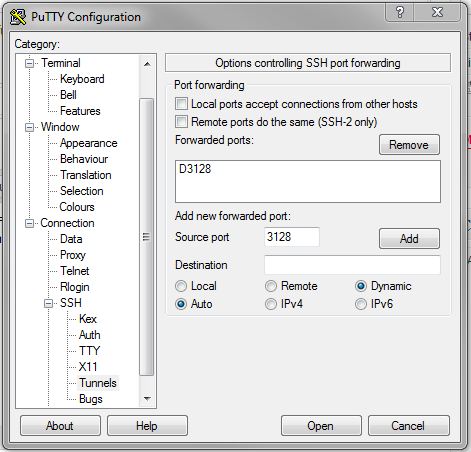
What we do here is something like a poor man’s ssh proxy: You ask PuTTy to open a connection and tunnel a port to a dynamic destination. I used port 3128 in our example which would be tunneled through our remote destination. Now any application that is able to use a socks proxy can connect through that port.
So if our firewall blocks i.e port 80 to prevent surfing, we could use Firefox’ feature to bypass that. As long as we can ssh to our target host which is able to use those specific ports, we successfully went around that blocker. As we use SSH, the connection itself is encrypted (but not DNS traffic!) which adds a little more security to it.
Comments
Loading comments…